
Lithium battery monitor app
See every cell of your lithium battery on your phone
CellBoss is an Android app for LiFePO4 batteries with a Bluetooth BMS: JK, JBD or Daly. It shows the charge, the power going in or out, and every cell’s voltage on one clean screen. Made for South African batteries: home backup, bakkies and 4x4s, caravans and boats.
CellBoss is in testing on Google Play now. Want to try it sooner with your own battery? Email us.
- Read-only: never changes a setting
- No ads, no account
- Works with no signal
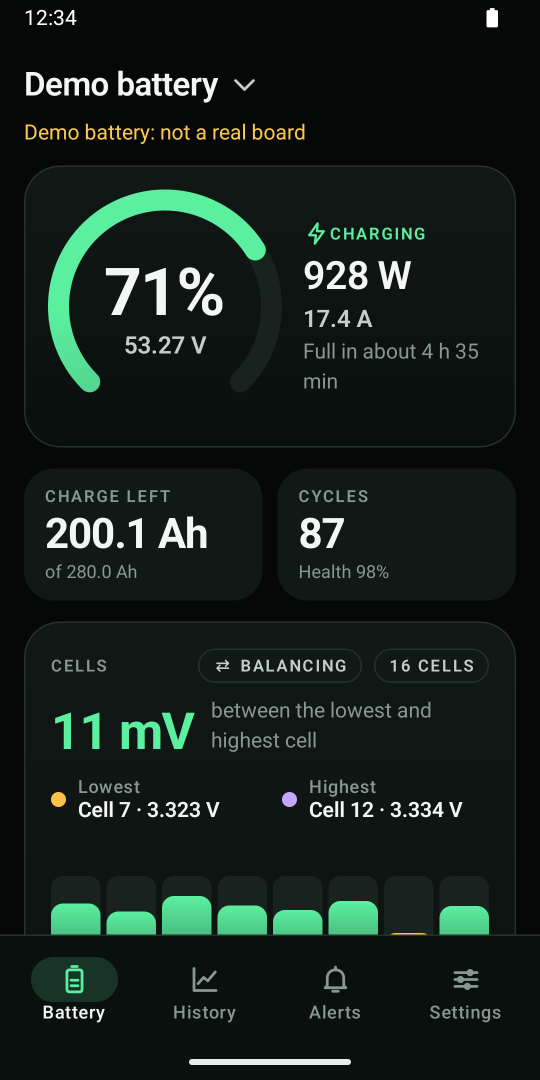
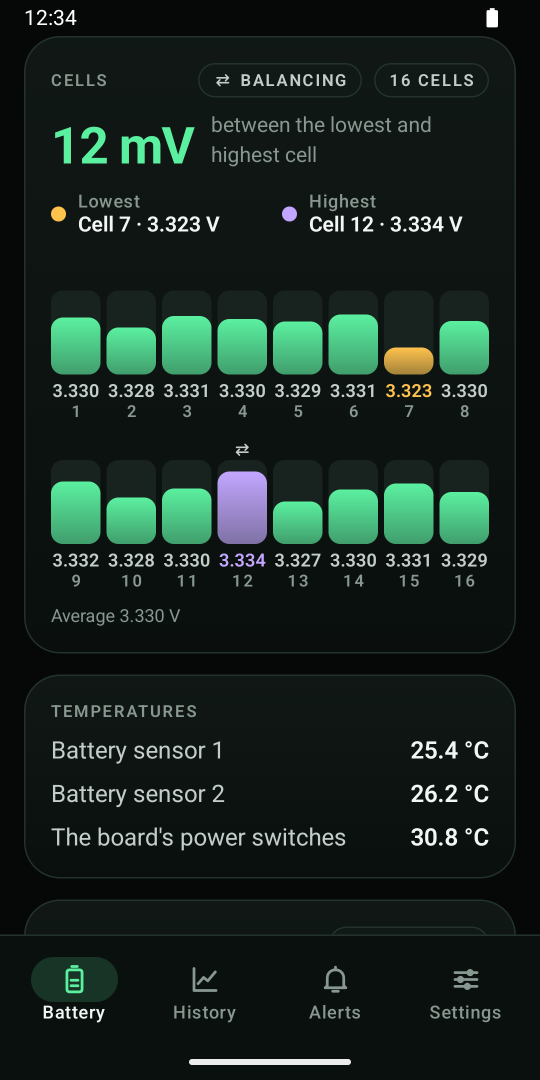
What CellBoss shows you
Your battery’s management board (the BMS) already knows all of this. Its own app hides it behind menus and settings. CellBoss puts it on one screen, in plain words.
The charge, at a glance
The charge in percent, the voltage, the power going in or out, and how long until it’s full or empty.
Every cell
Each cell’s voltage, the lowest and highest marked, and how far apart they are in millivolts. You see when the board is balancing.
Charge left and cycles
Amp-hours left of the battery’s capacity, the charge cycles so far, and the battery’s health as the board reports it.
Temperatures
The battery’s temperature sensors and the board’s power switches, so you know when it’s working hard or getting cold.
Alarms in plain words
“A cell is too low”, not a code. When the board raises an alarm, CellBoss says what it means.
The switches, never touched
You see whether the board lets the battery charge and discharge. CellBoss shows the switches and never changes them.
Read-only. Always.
Changing a BMS setting by mistake can wreck a battery. CellBoss can’t do that: it has no button that changes a setting, a switch or a calibration, not even a hidden one. It only reads.
That makes it safe to hand to anyone: your family at home, your crew on the boat, or the customer you built the battery for. They see everything, and they can’t change anything.
Your board keeps protecting your battery. CellBoss shows what the board reports. It isn’t a safety device.
Works with JK, JBD and Daly boards
These three boards sit inside most DIY and drop-in lithium batteries sold in South Africa. If yours has Bluetooth, CellBoss can read it.
JK (Jikong) smart BMS boards, common in 48 V home banks with Sunsynk and Deye inverters, and in 12 V and 24 V packs.
The JK BMS app →JBD boards, the ones the Xiaoxiang app reads. Inside many drop-in 12 V lithium batteries.
The JBD BMS app →Daly smart BMS boards with their Bluetooth module, used in many 12 V, 24 V and 48 V packs.
The Daly BMS app →Not sure what’s inside your battery?
Stand next to it and open your phone’s Bluetooth list. JK boards show names that start with JK- or JK_, and Daly boards start with DL-. JBD boards often show the battery maker’s name. Big-brand home batteries that only talk to the inverter usually can’t be read by a phone app.
CellBoss is new. If your board reads oddly, CellBoss can email us a data sample from the app, and we’ll fix it.
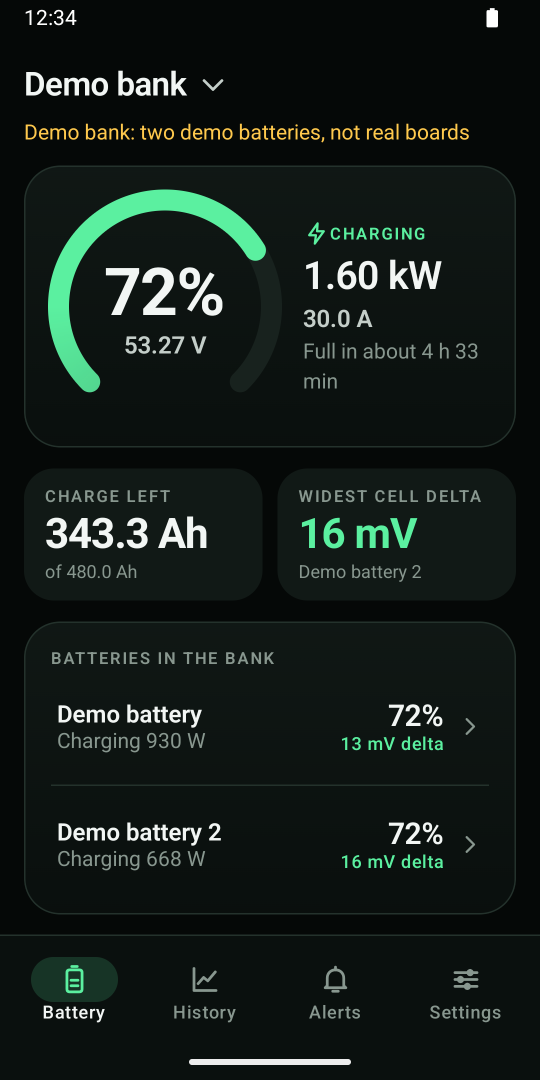
One battery, or a whole bank PRO
Two or more batteries in parallel? CellBoss adds them up: the total charge, the power going in or out, and which battery’s cells are furthest apart. Tap a battery to see its own cells.
Pair as many batteries as you have: the house bank, the bakkie and the caravan. Switch between them with a tap on the name.
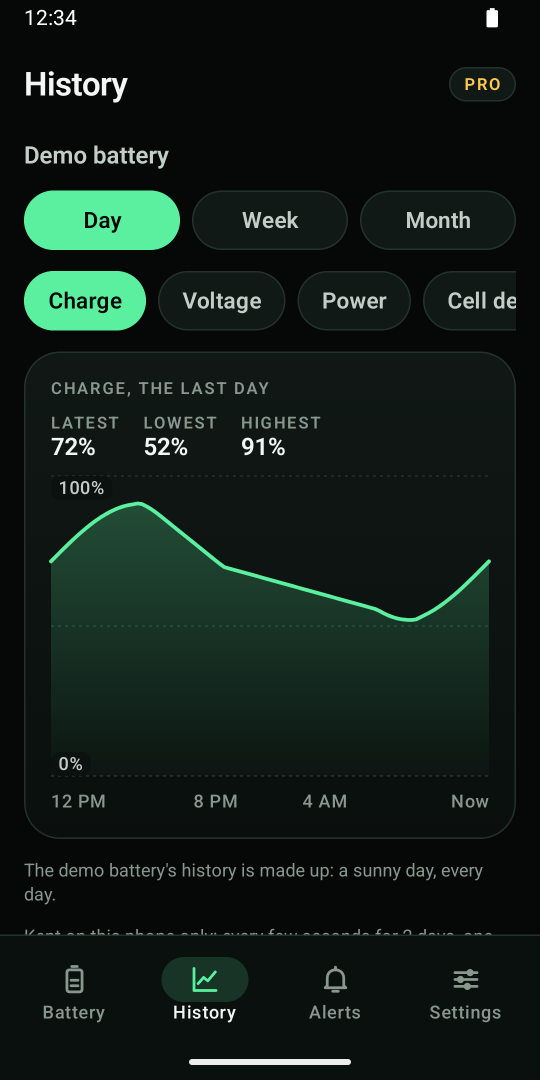
History, alerts and a report PRO
History: the charge, power, cell difference and temperatures by day, week and month, kept on your phone.
Alerts: a heads-up while CellBoss is open when a cell runs low or high, the cells drift apart, the charge runs low, or it’s too hot or too cold to charge.
A battery report: one PDF page with the battery’s state and its last 30 days. Handy for a warranty claim or when you sell the caravan. Your readings export as a spreadsheet too.
On your home screen PRO
The widget shows the charge, the power and how far apart the cells are, from the last reading. One look, no app to open.
And you can try everything before you own a battery like this: CellBoss has a built-in demo battery and a demo bank.
Private, and works in the bush
No account, no ads, no tracking. CellBoss doesn’t even have permission to use the internet. It talks to your battery over Bluetooth, and your readings stay on your phone.
No signal? No problem
In the Kalahari, on a boat or during load shedding when the towers are down: CellBoss only needs Bluetooth.
No location permission
CellBoss pairs through Android’s own pairing screen, so it never asks where you are.
Try it with no battery
The demo battery runs a sunny day, every day. The demo bank shows two batteries added up.
Free to use, with Pro when you want more
The live screen with every cell is free, for good. Pro adds history, alerts, more batteries, the widget and the report.
Free
- One battery’s live screen with every cell
- Temperatures, alarms and the board’s switches
- The demo battery and demo bank
- No ads and no time limit
CellBoss Pro
or R249.99 a year. 7 days free first, through Google Play.
- History by day, week and month
- Alerts while CellBoss is open
- Several batteries, and the bank view
- The home-screen widget
- The battery report (PDF) and spreadsheet export
Google Play takes the payment. Cancel any time in Google Play’s subscriptions.
Made for how South Africans use lithium
Home backup
Your 48 V bank next to the inverter: see every cell, not just the charge on the inverter’s screen.
Home backup and load shedding →4x4, caravan and camping
Know how long the fridge can run, and whether the solar is keeping up, without a signal.
4x4 and caravan →Do you need a shunt?
Your BMS already measures the current. Here’s when a separate battery monitor still makes sense.
BMS or shunt →LiFePO4 voltage chart
12 V, 24 V and 48 V batteries: what the voltage says about the charge, and why it’s often wrong.
The voltage chart →Questions
Which batteries does CellBoss work with?
Lithium batteries, LiFePO4 most of all, with a JK, JBD or Daly management board (BMS) that has Bluetooth. Many DIY and drop-in batteries in South Africa have one of these boards.
Does it work with my Sunsynk or Deye inverter’s battery?
If the battery has a JK, JBD or Daly board with Bluetooth, yes. CellBoss reads the battery’s board directly over Bluetooth, not the inverter, and leaves the board’s link to your inverter alone.
Can CellBoss change my BMS settings?
No. CellBoss is read-only: it never changes a setting, a switch or a calibration.
Do I need internet or signal?
No. CellBoss talks to your battery over Bluetooth and never uses the internet.
How close do I need to be to the battery?
Within Bluetooth range, often about 10 metres in the open. Walls, metal boxes and canopies make it shorter.
Can I still use the board maker’s app?
Yes, just not at the same moment: most boards talk to one phone at a time. Close the other app before you open CellBoss.
Is there an iPhone version?
Not yet. CellBoss is for Android 8.0 or newer, on a phone with Bluetooth.
What does Pro cost?
R29.99 a month or R249.99 a year in South Africa, with 7 days free first. You pay through Google Play and can cancel there any time.
When can I get CellBoss?
CellBoss is in testing on Google Play now and opens to everyone soon. Email support@kindlymadeapps.com and we’ll tell you when it’s out.
Know every cell of your battery
Free to start. Read-only, private, and no ads.
CellBoss is in testing on Google Play now. Want to try it sooner with your own battery? Email us.